
Context
Fingerprint attendance was unsuitable when contactless entry became necessary. Operations needed an approach that could integrate with internal systems and extend to related check-in records.
Solution
A camera-based application registers a user, recognizes the returning face, marks attendance, and can associate the event with a configurable check-in form. The prototype demonstrates the feasibility of an integrated hardware and software station.
Potential benefits
Benefits are working hypotheses to validate against the target data, workflow and operating environment.
- Enables contactless check-in
- Automates attendance capture
- Creates a reviewable entry record
- Can integrate with broader workplace workflows
Where VisionID Can Be Used
- Employee Attendance
- Visitor Management
- Office Access
- Factory Entry
- Campus Check-in
- Contactless Registration
- Workforce Time Tracking
- Secure Area Access
Product workflow
Prototype screens use demonstration data and illustrate the workflow rather than a production deployment. Interfaces and outputs are configured for each organization.
Third-party names and interfaces, where visible, identify demonstration context only. Their marks belong to their respective owners and do not imply endorsement or partnership.
VisionID Contactless Access Journey
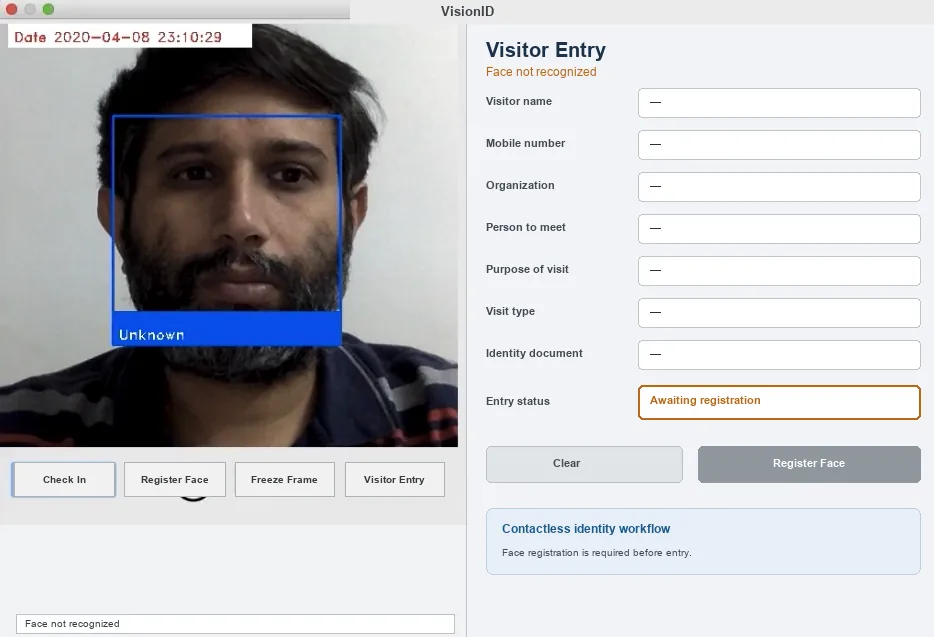
1. Detect an unknown visitor
The camera detects a face, but VisionID finds no registered identity match. The interface therefore prompts the operator to begin face registration before access can be granted.
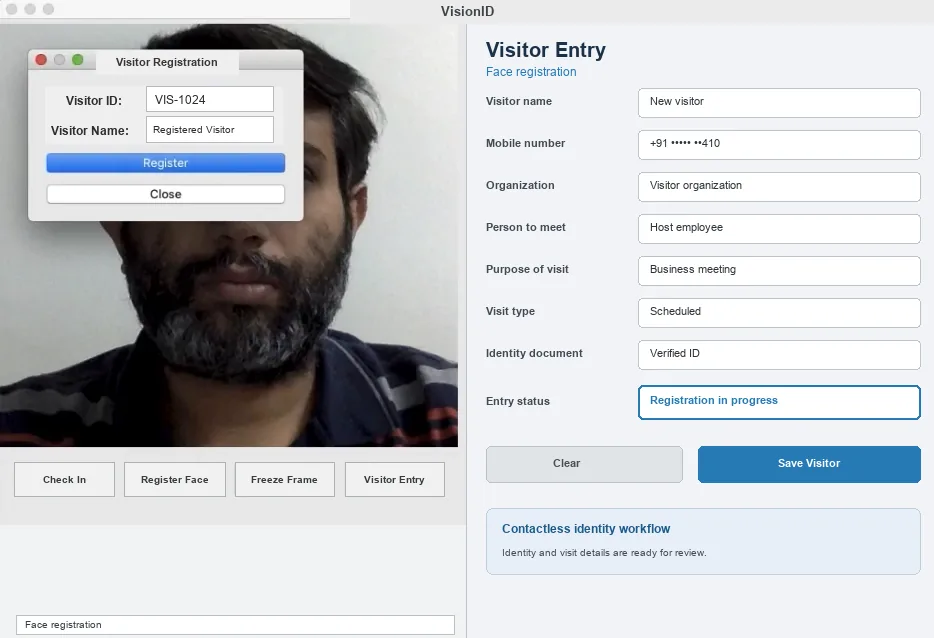
2. Register the face and visit
The captured face is associated with a visitor identifier. The visitor-entry form records the organization, host, purpose, visit type and identity-document status needed for review.

3. Recognize the registered identity
After enrollment, facial landmarks are matched with the registered record and VisionID retrieves the corresponding visitor details for verification.
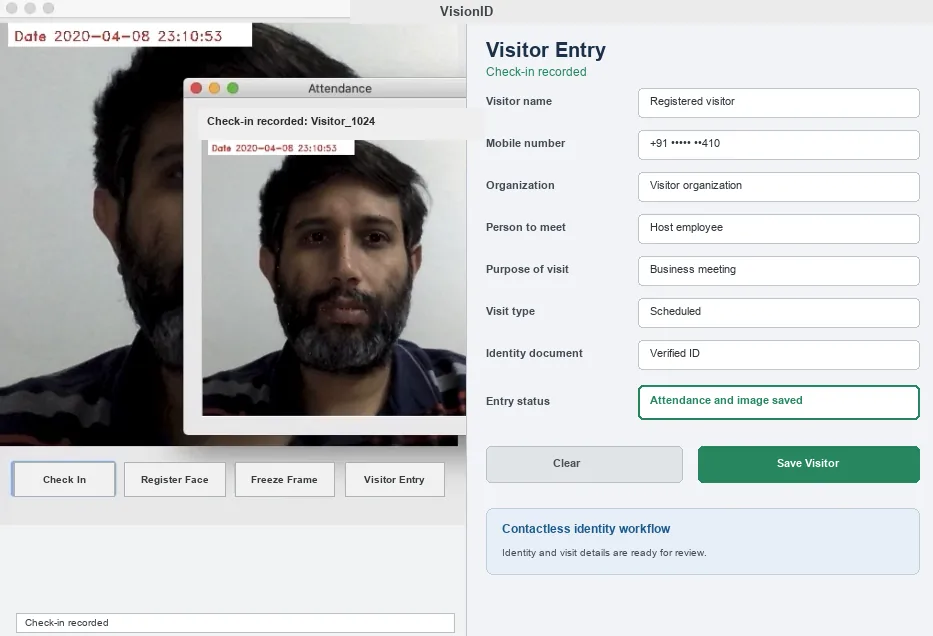
4. Record attendance and evidence
The visitor arrival is marked automatically and a time-stamped face image is retained with the record, creating reviewable evidence for attendance and access administration.
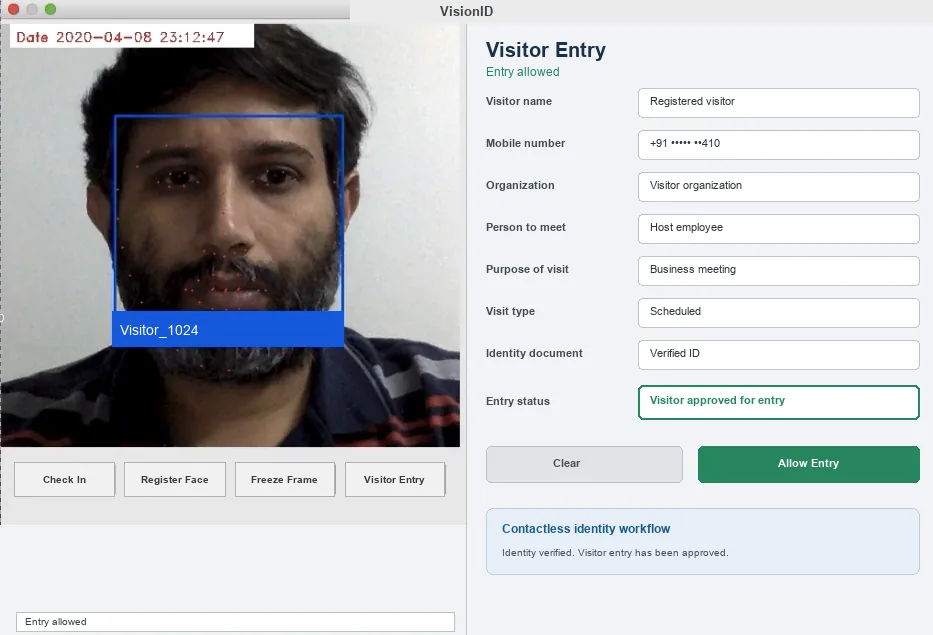
5. Allow contactless entry
With identity and visit information verified, the workflow records approval and allows the visitor to proceed without a fingerprint scan or physical attendance register.
How this implementation works
- First visit: VisionID detects a face in the camera feed but cannot recognize the individual because no matching identity has been registered.
- Face registration: The visitor is enrolled by associating the captured facial image with a visitor identifier and entry details.
- After registration: VisionID recognizes the returning individual and retrieves the corresponding visitor record.
- Check-in recorded: Attendance or arrival is marked automatically, and the captured face image is saved as part of the entry record.
- Entry allowed: Once identity and visit details are verified, the visitor is approved for contactless access.
Responsible deployment
Production use requires fit-for-purpose evaluation, privacy and security controls, clear human accountability, monitored performance, and a fallback for uncertain or harmful outputs.
- Use biometric processing only with a valid legal basis, clear notice and a non-biometric alternative where appropriate.
- Test false-match and false-reject rates for the deployment population and route uncertain matches to human review.
- Encrypt templates, restrict access and delete biometric data according to a documented retention schedule.