
Context
Recruitment, staffing and consulting teams often need to present candidates or employees in an approved company format. Source resumes vary in structure, length and visual design, so preparing each profile requires someone to read the complete document, identify relevant information, condense the work history, add a photograph and repeatedly adjust a PowerPoint slide. The manual process is slow, introduces copy-and-paste risk and makes consistent client-facing output difficult at volume.
Solution
Accepts a digital resume document through drag-and-drop or file selection and confirms that the source document was uploaded successfully.
Extracts the resume text and displays it in the application so the user can inspect the captured source content before generation.
Accepts a separate profile image file, allowing an approved photograph to be used even when the source resume does not contain one.
Generates a standardized PowerPoint profile from the resume content, photograph and predefined presentation template.
Condenses and organizes the source information into a professional summary, technical skills, education and certifications, and an experience summary.
Provides the completed profile as a downloadable PowerPoint file that remains editable for factual, brand and client-specific review.
Keeps the user responsible for checking extracted content and the final presentation before it is shared externally.
Potential benefits
Benefits are working hypotheses to validate against the target data, workflow and operating environment.
- Accelerates candidate and consultant profile preparation
- Reduces repetitive reading, copying, summarizing and slide formatting
- Improves consistency across client-facing talent profiles
- Makes extracted resume content visible for review
- Reduces transcription and template-compliance errors
- Supports higher-volume candidate and proposal workflows
- Preserves flexibility through an editable PowerPoint output
- Keeps final quality control with the recruitment or consulting team
Where ProfileBuilder Can Be Used
- Candidate Profile Creation
- Consultant Profile Creation
- Client Candidate Submissions
- Staffing and Project Proposals
- Internal Talent Directories
- Skills and Experience Summaries
- Standardized Resume Formatting
- Recruitment Operations
- Professional-services Resourcing
- Capability and Pitch Decks
- Bid and Proposal Support
- Internal Talent Mobility
Product workflow
Prototype screens use demonstration data and illustrate the workflow rather than a production deployment. Interfaces and outputs are configured for each organization.
Third-party names and interfaces, where visible, identify demonstration context only. Their marks belong to their respective owners and do not imply endorsement or partnership.
ProfileBuilder Journey
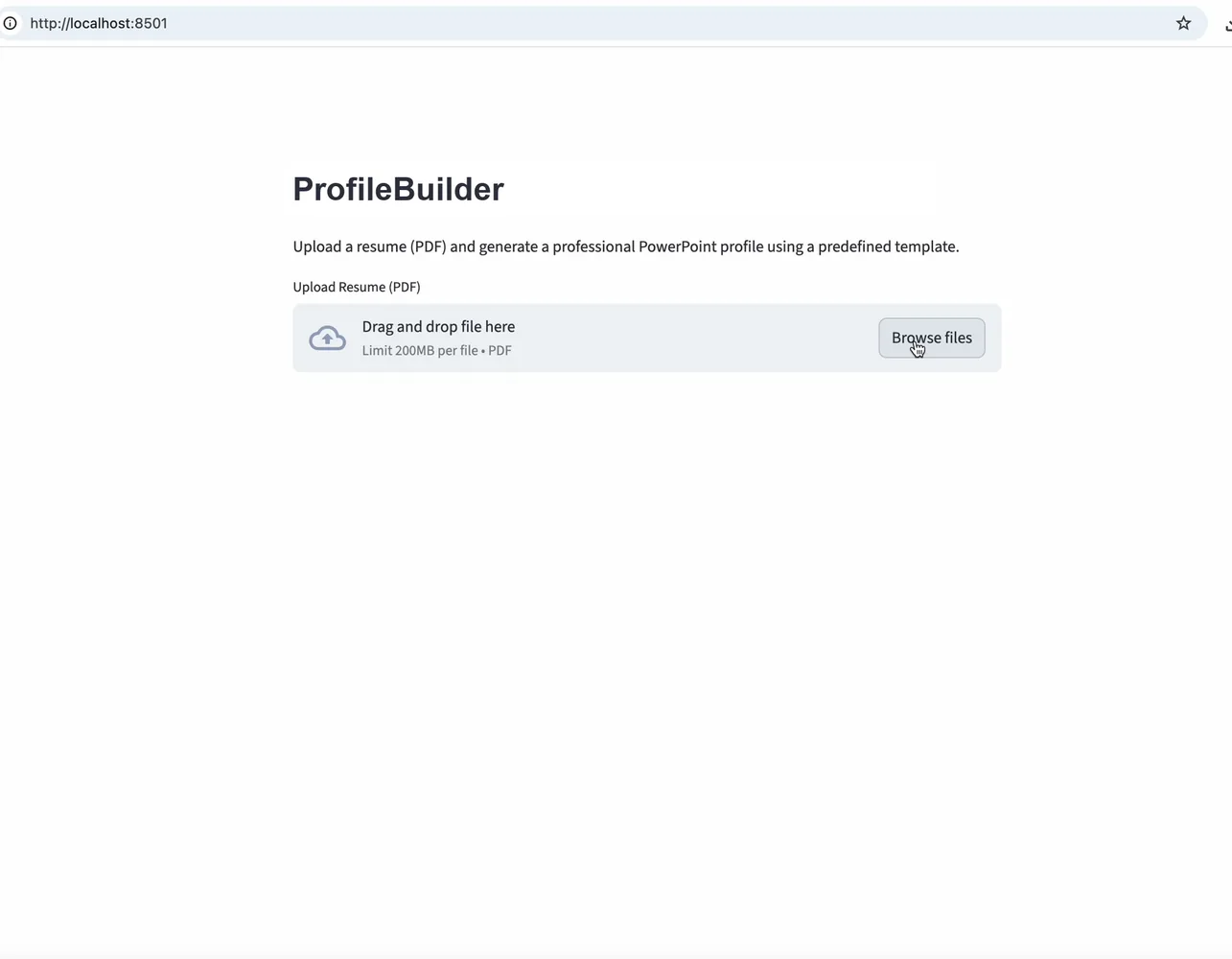
1. Upload the source resume
The workflow begins with a focused document upload control. The user can drag and drop a resume or browse for a file, providing the unstructured source document that will be converted into the standardized profile.
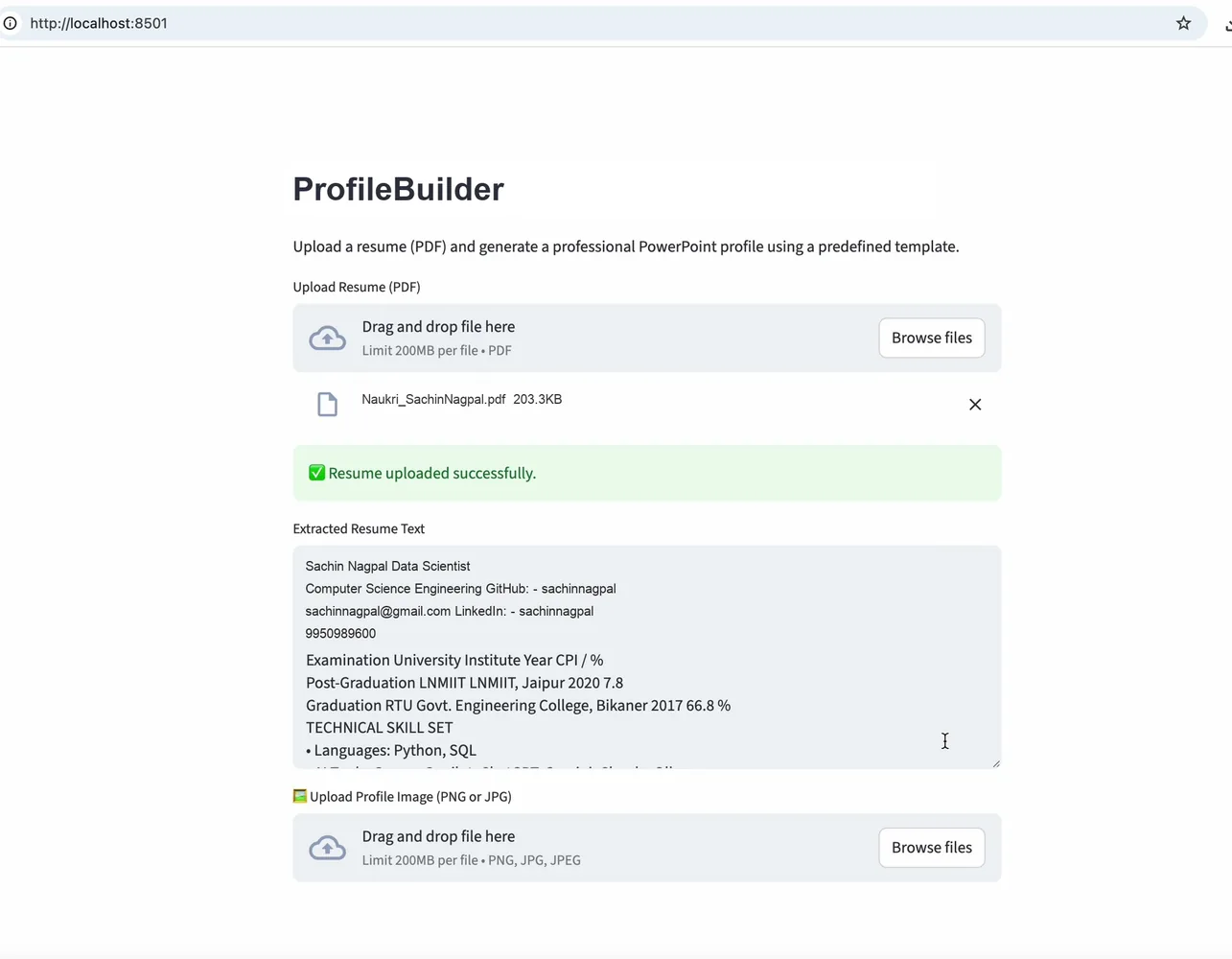
2. Review the extracted content
After upload, the application confirms success and exposes the extracted resume text. This intermediate view gives the user a clear checkpoint to verify that key source information is available before the presentation is generated.
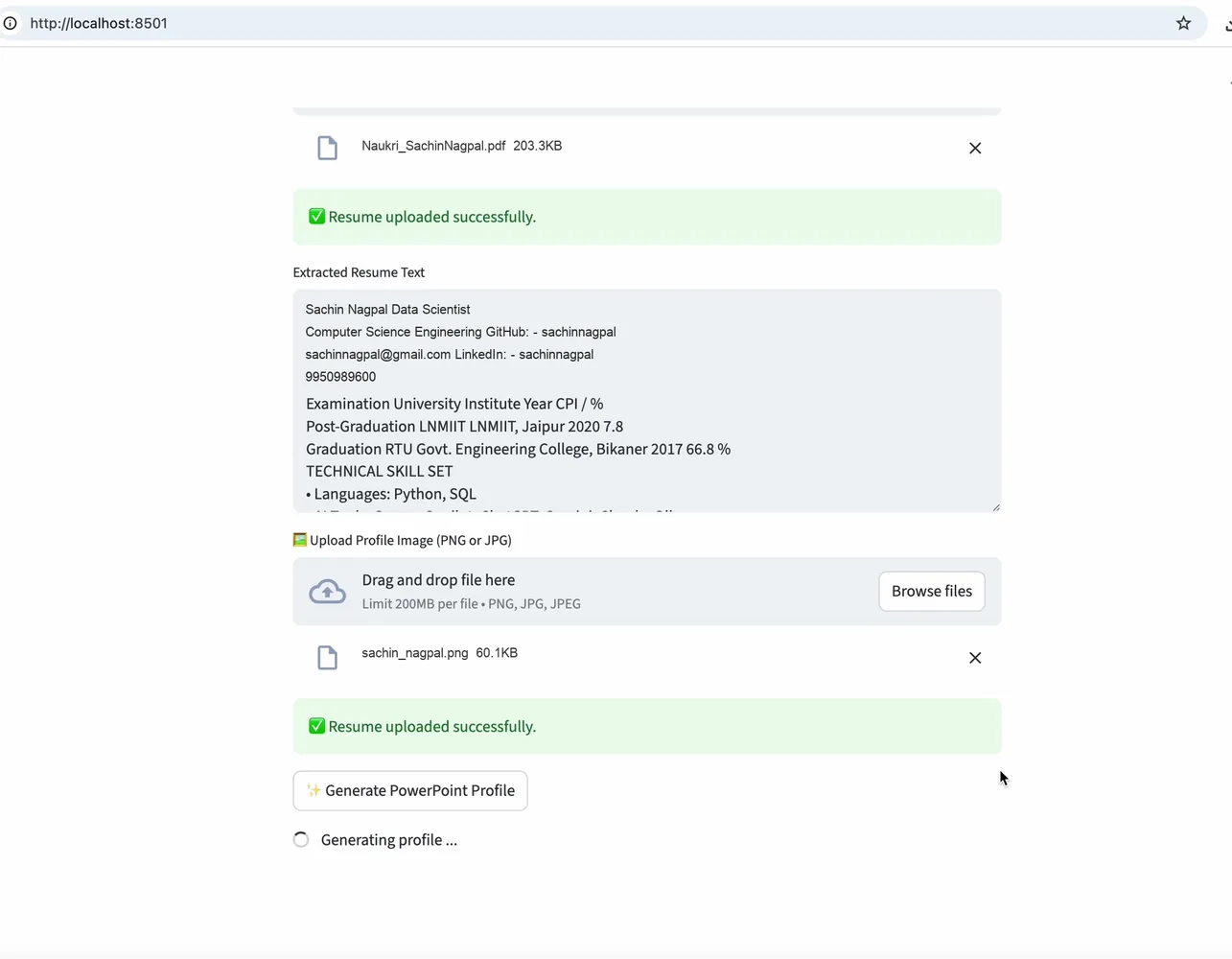
3. Add the photograph and generate
A separate image upload allows the user to supply an approved photograph. With the resume and image in place, Generate PowerPoint Profile starts the automated extraction, summarization and template-population process.
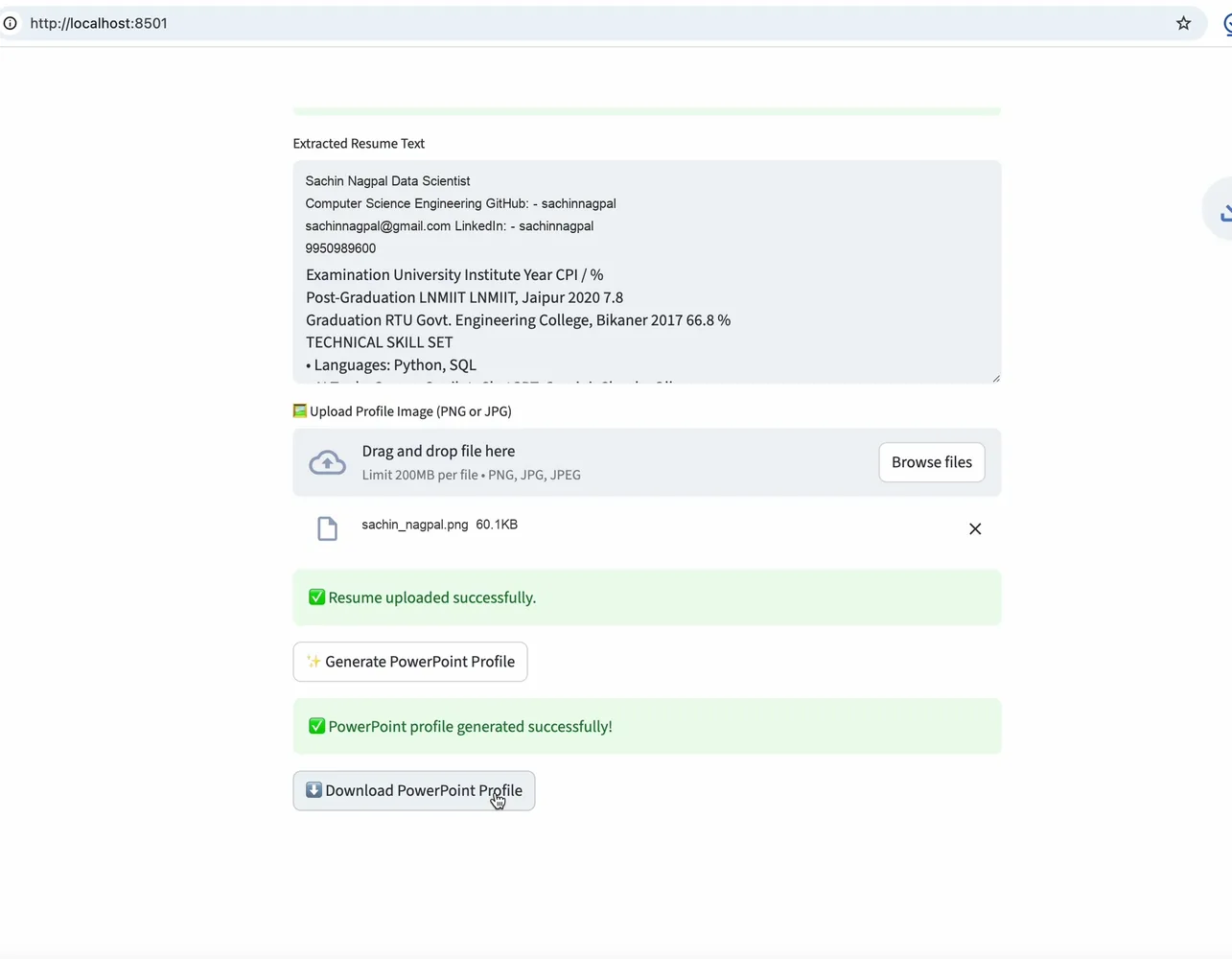
4. Download the completed profile
A success message confirms that generation is complete and a direct download action makes the resulting PowerPoint available without moving to another tool or rebuilding the profile manually.
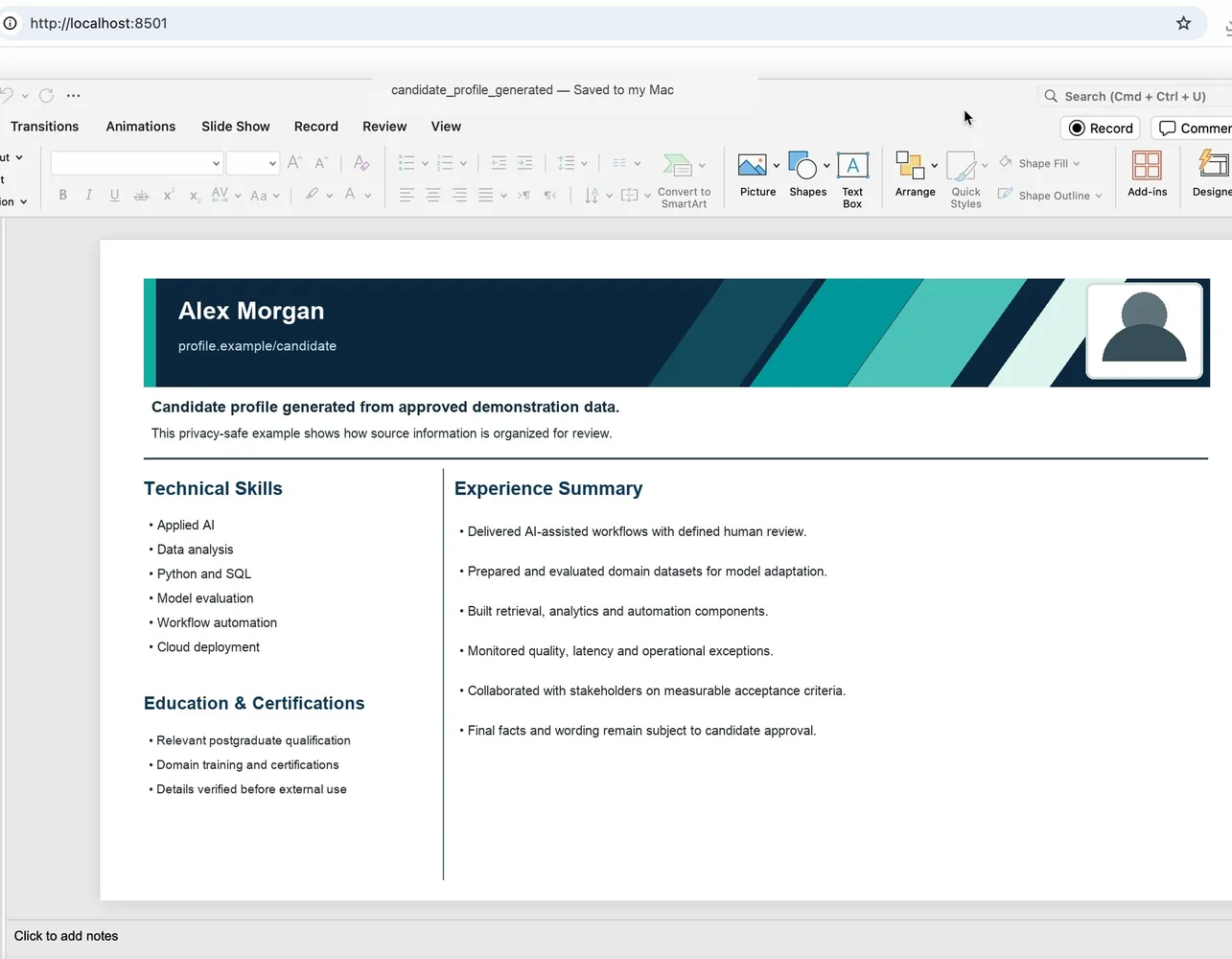
5. Review and refine the editable output
The generated slide organizes the candidate photograph, name, professional link, summary, technical skills, education, certifications and experience highlights in a consistent layout. Opening it in PowerPoint demonstrates that the output remains editable for final factual and client-specific review.
How this implementation works
- The user uploads the source resume as a digital document through the application's drag-and-drop or file-browser control.
- The application confirms the upload and extracts the resume text into a visible review area so the user can check the source interpretation.
- The user uploads a separate profile photograph to accompany the candidate information in the presentation template.
- After both inputs are available, the user selects Generate PowerPoint Profile to start the template-based document-generation workflow.
- The application identifies and condenses relevant candidate information into a concise professional summary, technical skills, education and certifications, and experience highlights.
- Successful generation exposes a direct Download PowerPoint Profile action in the same workflow.
- The downloaded file opens as a native PowerPoint presentation with the candidate name, photograph, professional link and structured profile content placed into a consistent layout.
- Because the output remains editable, the user can verify facts, refine wording and apply any final client-specific or brand changes before sharing it.
Responsible deployment
Production use requires fit-for-purpose evaluation, privacy and security controls, clear human accountability, monitored performance, and a fallback for uncertain or harmful outputs.
- Validate output quality against representative data and agreed acceptance measures before production use.
- Keep an accountable person in control of consequential decisions and exception handling.
- Limit access, collection and retention to the documented business purpose.